
쿠버네티스 기본 개념 이해하기
이 글의 목차
개요
역사
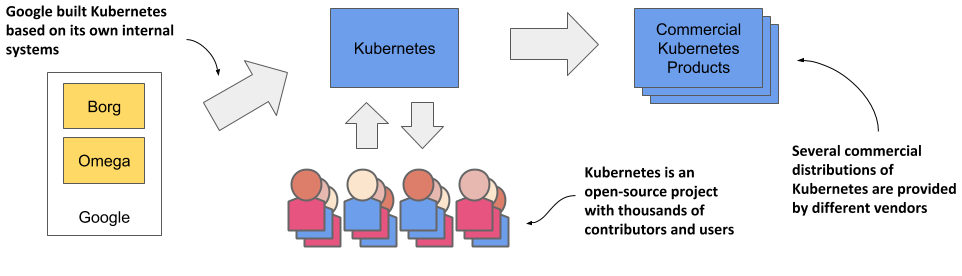
구글에서 시작되어 커뮤니티가 발전시킨 오픈소스 프로젝트
여러가지 상용 쿠버네티스가 탄생했다 (Openshift, EKS, GKE ..)
필요성
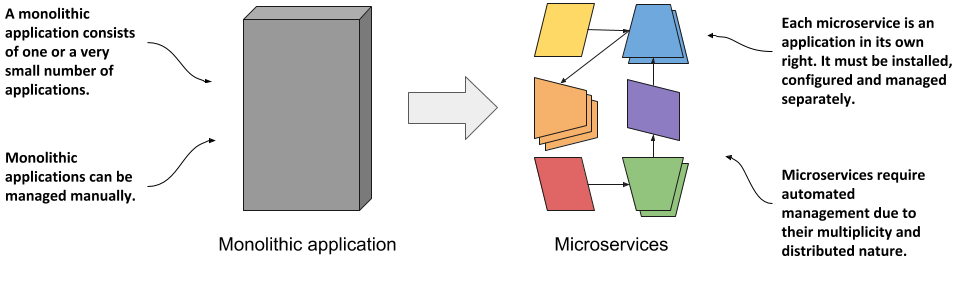
Container 기반 MicroService를 위한 플랫폼
Dev + Ops 문화를 적용
Cluster
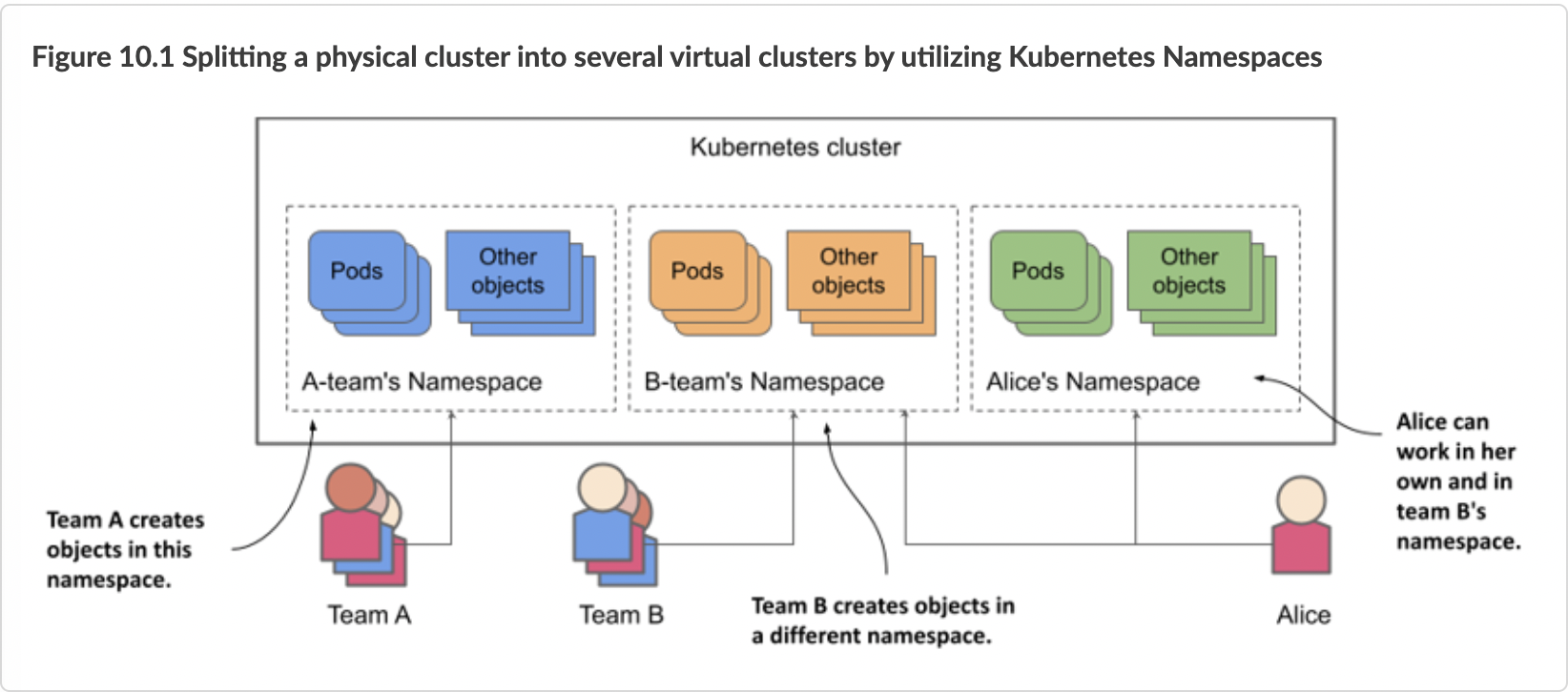
서버 인프라 위에 가상 레이어를 구성
사용자 앱은 그위에서 관리됨
개발자는 직접적으로 인프라를 다룰 필요없음

Namespace
쿠버네티스 리소스를 논리적으로 분리하여 관리하는 개념
무엇을 제공하나?
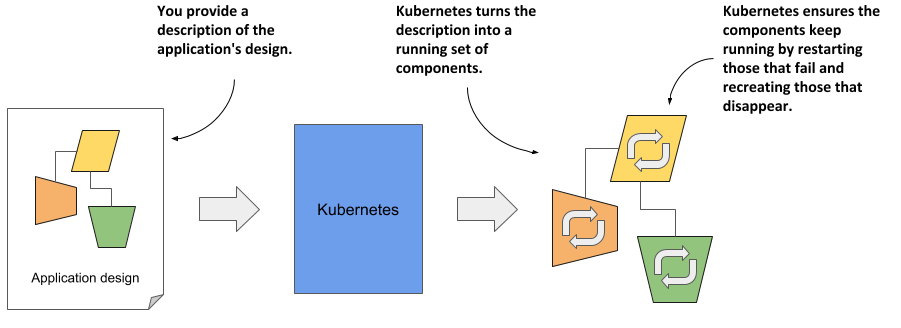
앱 상태 정의를 주면 정의된 대로 운영해준다
앱 상태 정의: yaml/json 형태 k8s 리소스 정의
k8s 리소스?
apiVersion: apps/v1 kind: Deployment metadata: name: broken-pods spec: replicas: 3 selector: matchLabels: app: broken-pod template: metadata: labels: app: broken-pod spec: containers: - name: broken-container image: busybox command: ["sh", "-c", "exit 1"]
앱 상태 정의가 변경되면?
쿠버네티스가 새러운 정의에 맞게 모든 것을 바꿔준다
결론: 앱 상태 정의만 잘하면 된다!

쿠버네티스는 다 같은 쿠버네티스
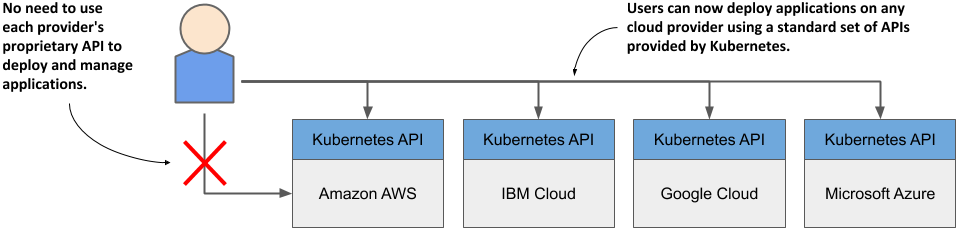
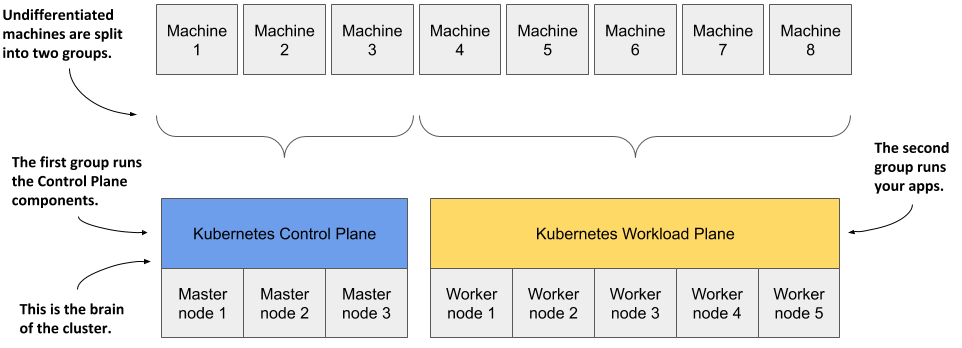
k8s 클러스터 구성
Controlplane 노드
k8s가 동작하기 위해 필요한 컴포넌트들이 실행
api-server
etcd
contoller-manager
scheduler
...
Workload 노드
사용자 Application들이 실행
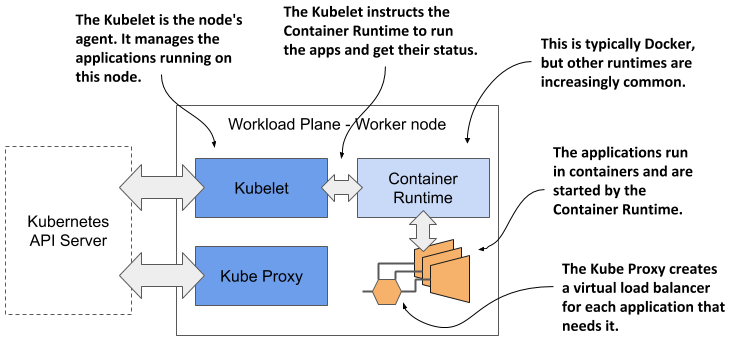
각 노드 내부 구성
Container Runtime이 있다
k8s 노드 agent가 제어
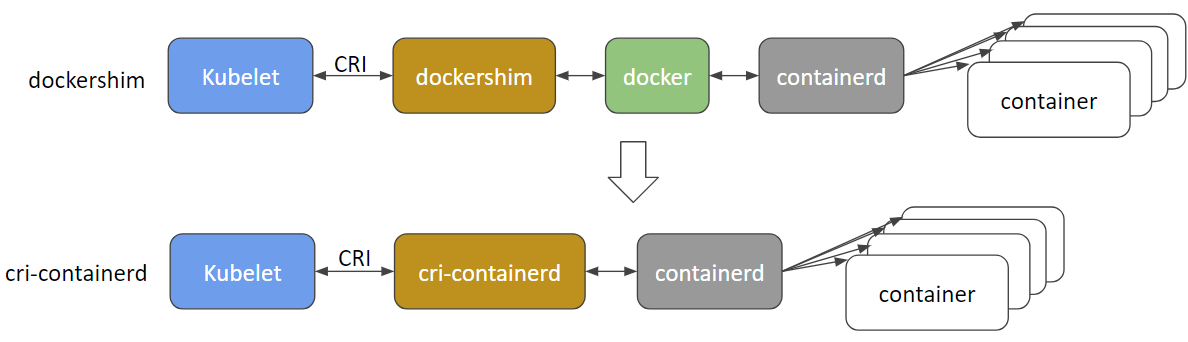
k8s와 Docker 관계
docker가 유일한 Runtime이었다
다른 Runtime들의 등장(rkt,hypernetes)
쿠버네티스 CRI
Docker Engine is not CRI-compatible
Dockershim
k8s 1.24 버전부터 Dockershim 지원 중단
containerd, cri-o,
쿠버네티스와 커뮤니케션 하는 방법
kubectl
helm
argocd
lens와 같은 kubernetes dashboard툴
모두 kube-api를 통한다
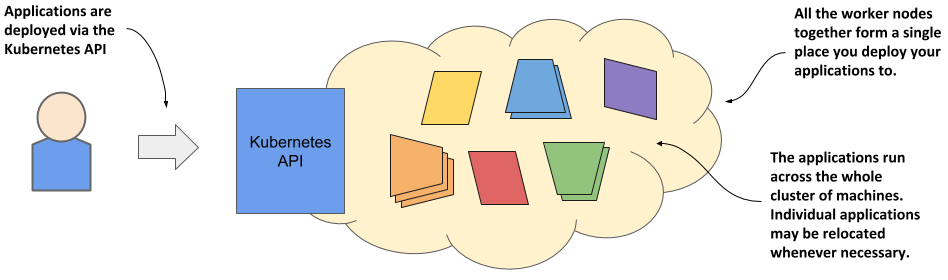
Workloads
Container
아래 리눅스 커널 기능을 활용하여 Container를 구현
namespace - 논리적으로 분리하는 기능
cgroup - 리소스 제한 기능
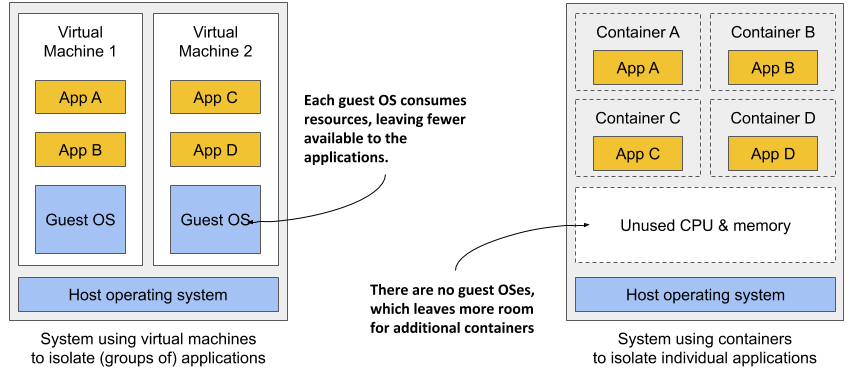
Container vs Virtual Machines
추가 OS, 추가 Kernel 없음
가상화하지 않기 때문에 Performance 저하 없음
Pod
정의:
Pod는 쿠버네티스에서 가장 작고 기본적인 배포 단위입니다.
스토리지 및 네트워크 리소스를 공유하는 1개 이상의 컨테이너로 구성됩니다.
논리적 단일 애플리케이션 단위를 나타냅니다.
주요 특징:
공동 위치 및 공동 스케줄링: Pod 내의 모든 컨테이너는 동일한 노드에서 실행되며 함께 스케줄링됩니다.
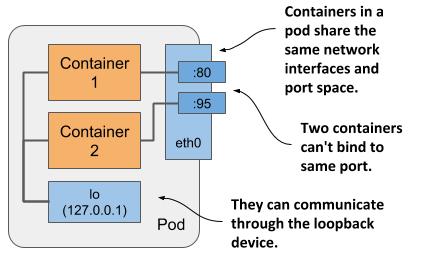
공유 네트워크 네임스페이스: 컨테이너는 동일한 IP 주소 및 네트워킹 구성을 공유합니다.
공유 스토리지: Pod는 영속적인 데이터 저장소를 위한 공유 볼륨에 액세스할 수 있습니다.
일시적(Ephemeral): Pod는 일반적으로 종료 후 다시 생성되도록 설계되었습니다.
구성 요소:
컨테이너: Pod 내의 실제 애플리케이션 실행 단위
볼륨: Pod에 연결된 영속 스토리지. 모든 컨테이너가 액세스할 수 있습니다.
시크릿 및 ConfigMap: 민감한 정보 또는 구성 데이터를 안전하게 저장합니다.
라이프사이클 후크: Pod 생성, 시작 또는 종료 중 실행되는 스크립트
Liveness and Readiness Probe: 컨테이너 상태를 모니터링하고 Pod 가용 여부를 확인합니다.
네트워크 통신:
Pod 내의 컨테이너는 루프백을 사용하여 자유롭게 통신할 수 있습니다.
Pod는 클러스터 네트워크 내부 IP 주소를 사용하여 서로 통신합니다.
Pod는 서비스를 통해 외부 서비스에 액세스합니다.
simple.yaml
apiVersion: v1
kind: Pod
metadata:
  name: nginx
spec:
  containers:
  - name: nginx
    image: nginx:1.14.2
    ports:
    - containerPort: 80
ReplicaSet
정의:
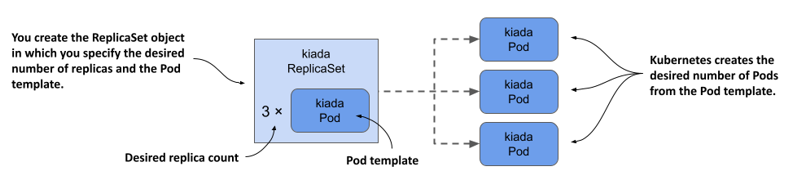
ReplicaSet는 컨테이너 이미지를 기반으로 Pod를 생성하고 관리하며, Pod가 종료되면 자동으로 다시 시작합니다.
ReplicaSet는 쿠버네티스에서 특정 애플리케이션에 대한 Pod의 원하는 갯수를 유지하는 데 사용되는 컨트롤러입니다.
핵심 특징:
Pod 갯수 유지: 사용자가 원하는 갯수의 Pod를 항상 실행 상태로 유지합니다.
Pod 관리: Pod 생성, 삭제, 재시작 등을 자동으로 관리합니다.
Pod 템플릿: Pod의 스펙(컨테이너 이미지, 리소스 요청/제한 등)을 정의합니다.
Selector와 Label
ReplicaSet는 관리할 대상 Pod를 label로 찾는다.
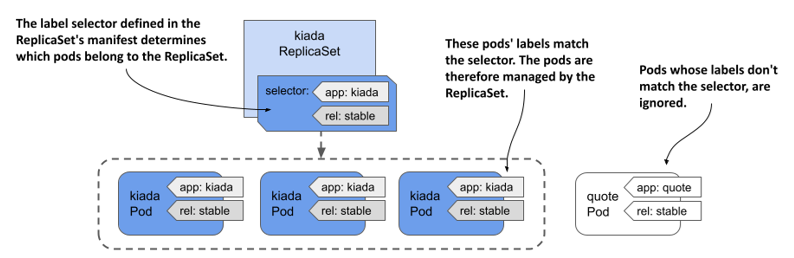
apiVersion: apps/v1
kind: ReplicaSet
metadata:
  name: frontend
  labels:
    app: guestbook
    tier: frontend
spec:
  replicas: 3
  selector:
    matchLabels:
      tier: frontend
  template:
    metadata:
      labels:
        tier: frontend
    spec:
      containers:
      - name: php-redis
        image: gcr.io/google_samples/gb-frontend:v3
Deployment
정의
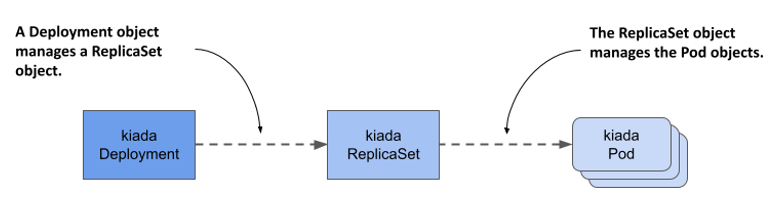
Deployment는 쿠버네티스에서 ReplicaSet을 통한 배포를 자동화하는 데 사용되는 리소스입니다.
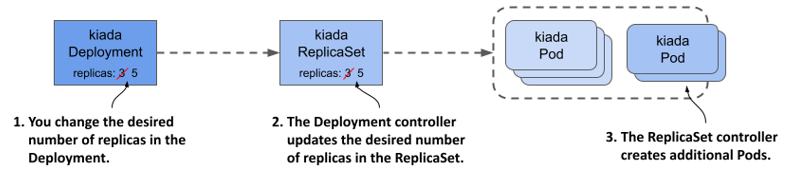
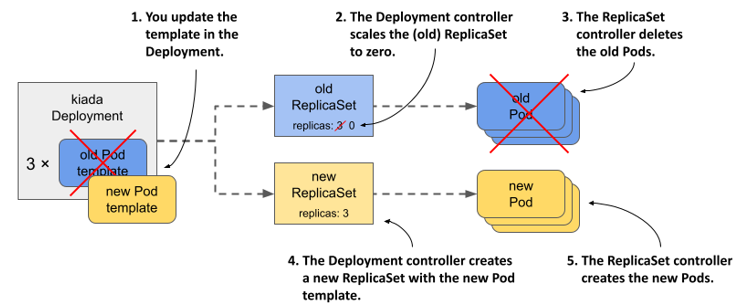
ReplicaSet를 기반으로 구현되어 Pod 갯수뿐만 아니라 Pod 스펙 변경까지 관리합니다.
핵심 특징
Pod 상태 관리: 사용자가 원하는 Pod 갯수와 스펙을 선언적으로 정의합니다.
Pod 템플릿: 새 Pod를 생성할 때 사용되는 스펙입니다.
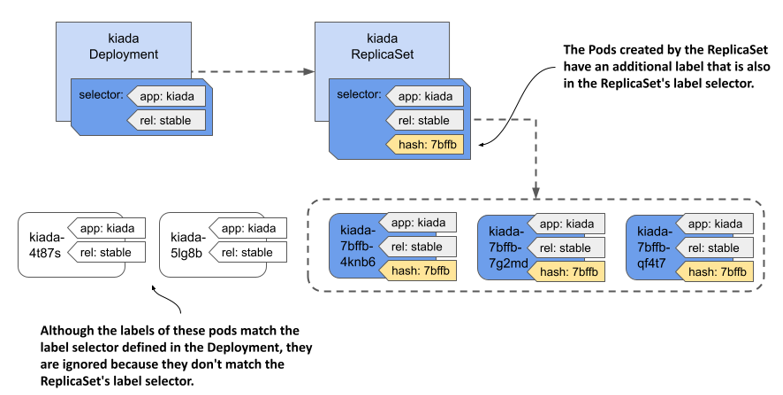
Selector: Deployment가 관리할 Pod를 선택하는 데 사용되는 레이블입니다.
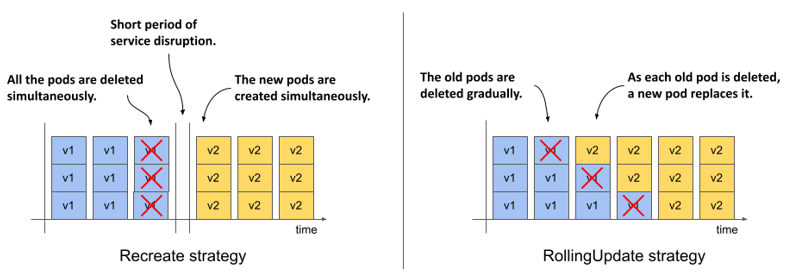
롤링 업데이트: Pod 템플릿을 변경하여 점진적으로 애플리케이션을 업데이트할 수 있습니다.
롤백: 업데이트 중 문제 발생 시 이전 버전으로 롤백할 수 있습니다.
다양한 업데이트 전략: 사용자 정의 가능한 업데이트 전략을 통해 배포 과정을 제어할 수 있습니다.
배포 방식
Recreate
Rolling Update
ReplicaSet 교체
Deployment는 새버전을 배포할 때 내부적으로 새로운 ReplicaSet을 만든다.
배포 기록
배포 기록은 ReplicaSet 형태로 남는다.
배포 기록 관리
롤백

Other Workloads…
DeamonSet
StatefulSet
Job
CronJob
App Config
ConfigMap
Secret
Configmap
ConfigMap은 컨테이너화된 애플리케이션의 설정 및 환경 파일을 컨테이너와 별도로 관리하는 데 사용됩니다.
Application 컨테이너와 설정를 분리함으로써 동일한 컨테이너를 다른 설정으로 여러 환경에 배포할 있게 됩니다.
동일한 이미지, 다른 환경
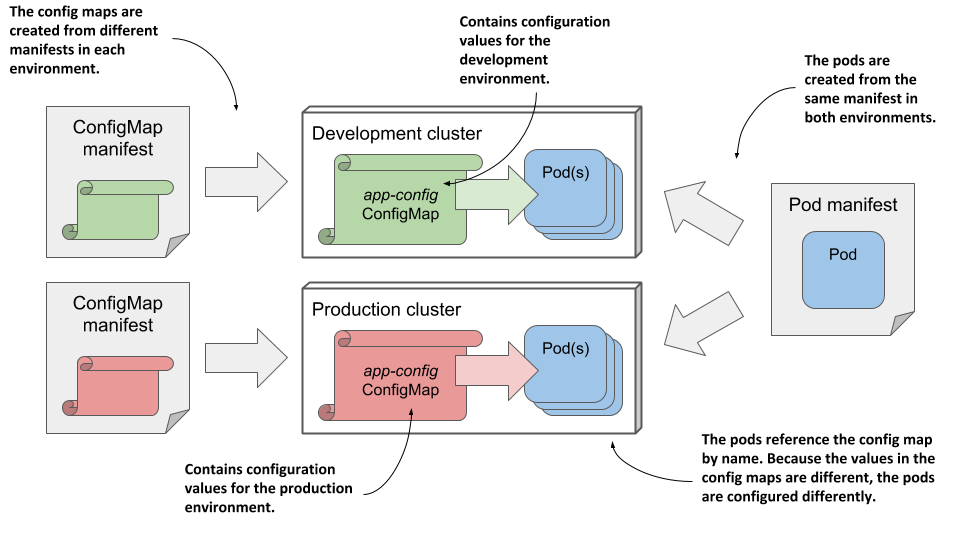
핵심 개념
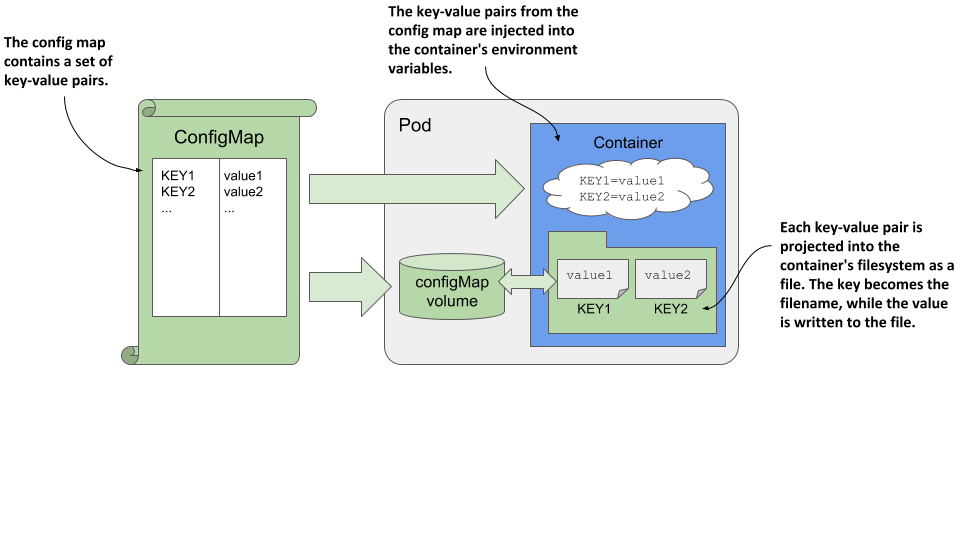
key-value pair: ConfigMap은 key-value pair으로 구성되며, 각 키는 설정 항목을 식별하는 역할을 합니다. 값은 해당 설정 항목의 데이터를 나타냅니다.
데이터: ConfigMap에 저장되는 데이터는 일반적으로 텍스트 형식입니다. 이 데이터는 환경 변수, 설정 파일, 명령줄 인자 등으로 사용될 수 있습니다.
볼륨 마운트: ConfigMap은 볼륨으로 마운트하여 애플리케이션 컨테이너 내부에서 구성 데이터에 액세스할 수 있습니다.
ConfigMap Usage
ENV
FILE
configmap.yaml
apiVersion: v1
kind: ConfigMap
metadata:
  name: my-config
data:
  db_host: db.example.com
  db_port: "3306"
pod.yaml
spec:
  containers:
    - name: my-app
      image: my-app-image
      envFrom:
        - configMapRef:
            name: my-config
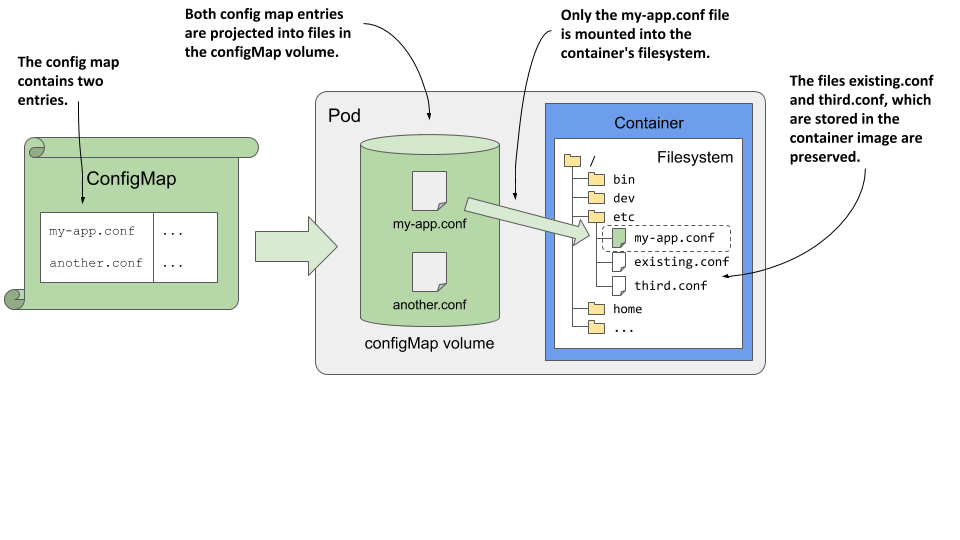
Configmap를 파일 형태로 마운트
key: 파일 이름
value: 파일 내용
configmap.yaml
kind: ConfigMap
metadata:
  name: my-configmap
data:
  my-config-file.txt: |
    key1=value1
    key2=value2
pod.yaml
apiVersion: v1
kind: Pod
metadata:
  name: my-pod
spec:
  containers:
  - name: my-container
    image: my-image
    volumeMounts:
    - name: config-volume
      mountPath: /path/to/config
  volumes:
  - name: config-volume
    configMap:
      name: my-configmap
      items:
      - key: my-config-file.txt
        path: my-config-file.txt
Secret
기본 사용 방법은 ConfigMap과 동일 하지만 민감한 데이터를 관리하는 목적의 리소스임으로 몇까지 차이점이 있다. 일반적으로 passwords, API tokens, TLS certificates, SSH keys 등을 저장하는데 사용한다.
ConfigMap과의 차이점:
base64 엔코딩
메모리에만 저장되고 디스크에는 저장되지 않는다.
데이터 형식에 대한 타입을 제공한다.
Built-in TypeUsageOpaquearbitrary user-defined datakubernetes.io/dockercfgserialized ~/.dockercfg filekubernetes.io/dockerconfigjsonserialized ~/.docker/config.json filekubernetes.io/basic-authcredentials for basic authenticationkubernetes.io/ssh-authcredentials for SSH authenticationkubernetes.io/tlsdata for a TLS client or serverkubernetes.io/service-account-tokenServiceAccount tokenbootstrap.kubernetes.io/tokenbootstrap token data

Docker config Secret
Container Registery 계정정보를 위한 특별한 Secret 형태
apiVersion: v1
kind: Secret
metadata:
  name: secret-dockercfg
type: kubernetes.io/dockercfg
data:
  .dockercfg: |
    eyJhdXRocyI6eyJodHRwczovL2V4YW1wbGUvdjEvIjp7ImF1dGgiOiJvcGVuc2VzYW1lIn19fQo=
일반 환경변수
  containers:
    - name: my-app
      image: my-app-image
      env:
        - name: DB_HOST
          value: db.example.com
        - name: DB_PORT
          value: "3306"
Network
Service
정의:
Pods are ephemeral!!!
고정 Endpoint: K8S 서비스는 클러스터 내 Pod의 집합에 대한 단일 접근점을 제공합니다.
traffic 분산: 서비스는 여러 Pod에 트래픽을 분산시키고 부하를 균형화합니다.
핵심 특징:
Load Balancing: 다양한 로드 밸런싱 알고리즘을 사용하여 트래픽을 분산합니다.
세션 유지: 세션 유지 정책을 통해 특정 Pod에 대한 클라이언트 연결을 유지합니다.
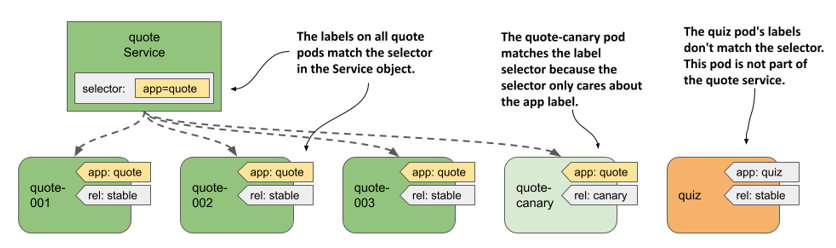
replicaSet와 같이 대상 Pod를 라벨로 찾는다.
서비스 유형:
ClusterIP: 클러스터 내 Pod에서만 서비스에 접근할 수 있습니다.
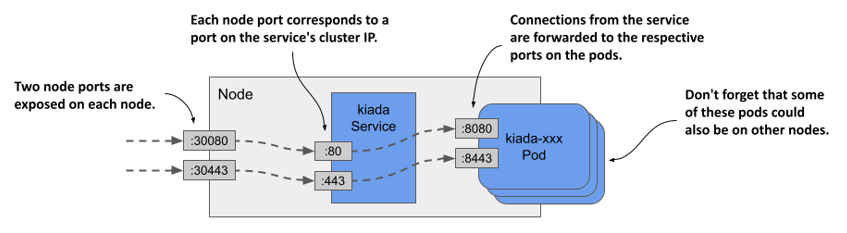
NodePort: 모든 노드의 특정 포트를 통해 서비스에 접근할 수 있습니다.
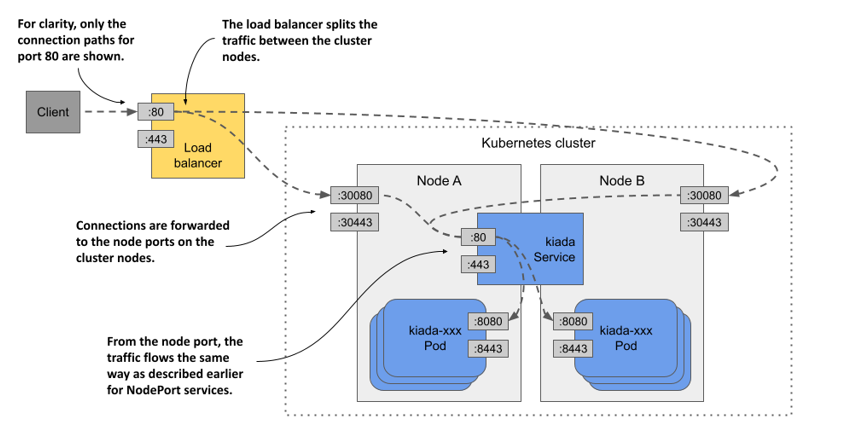
LoadBalancer: 클라우드 로드 밸런서를 사용하여 서비스에 접근할 수 있습니다.
ExternalName: 외부 endpoint에 대한 정보를 관리할 수 있습니다.
ClusterIP
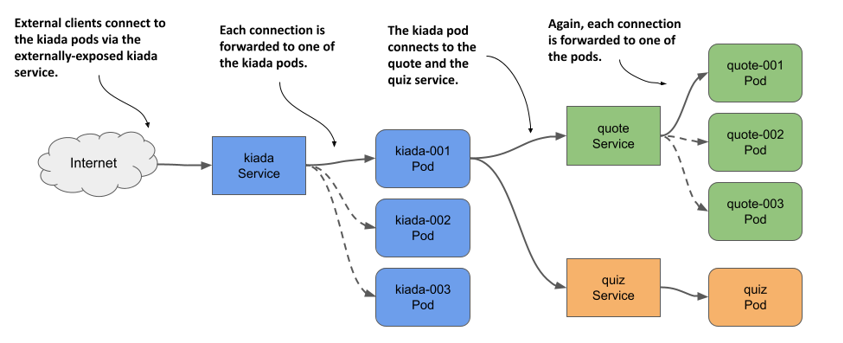
가상 IP 주소: ClusterIP 서비스는 클러스터 내에서만 접근 가능한 가상 IP 주소를 할당합니다. 이를 통해 다른 Pod이나 서비스는 해당 가상 IP 주소를 사용하여 서비스에 접근할 수 있습니다.
내부 통신: ClusterIP 서비스는 주로 클러스터 내부의 서비스 간 통신을 위해 사용됩니다. 클러스터 내의 다른 Pod이나 서비스가 해당 서비스를 호출할 때 사용됩니다.
로드 밸런싱: 여러 Pod을 가지고 있는 서비스의 경우 ClusterIP 서비스는 로드 밸런싱을 수행하여 요청을 여러 Pod으로 분산시킵니다.
스티커 세션 유지: ClusterIP 서비스는 클라이언트와 서비스 간의 연결을 유지하고 세션을 관리하는 기능을 제공하지 않습니다. 따라서 서비스와 클라이언트 간의 상태를 유지하기 위해서는 StatefulSet과 같은 다른 리소스를 사용해야 할 수 있습니다.
Kubernetes DNS: ClusterIP 서비스에는 클러스터 내에서 DNS 이름이 자동으로 할당됩니다. 이를 통해 다른 Pod이나 서비스는 DNS 이름을 사용하여 서비스에 접근할 수 있습니다.
apiVersion: v1
kind: Service
metadata:
  name: my-service
spec:
  selector:
    app.kubernetes.io/name: MyApp
  ports:
    - name: http
      protocol: TCP
      port: 80
      targetPort: 9376
    - name: https
      protocol: TCP
      port: 443
      targetPort: 9377
Node Port
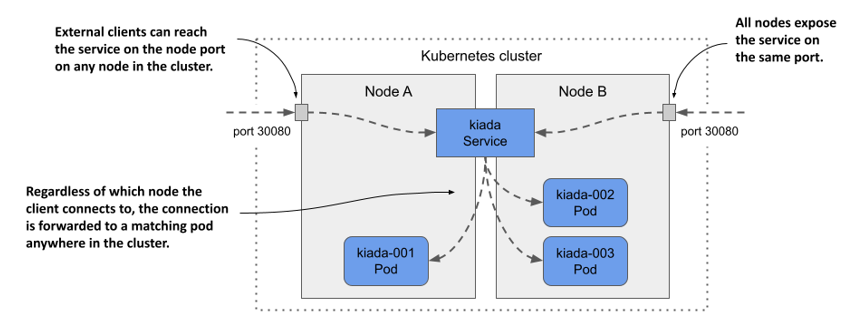
외부 액세스: NodePort 서비스를 사용하면 클러스터 내의 애플리케이션에 외부에서 접속할 수 있도록 지정된 포트를 통해 노출시킵니다.
노드 포트(NodePort): 클러스터의 각 노드에서 서비스에 접속할 수 있는 포트를 정의합니다. 클러스터의 모든 노드는 해당 포트를 통해 서비스에 접근할 수 있습니다.
타겟 포트(Target Port): 서비스가 연결할 백엔드 애플리케이션의 포트를 정의합니다. NodePort 서비스는 이 포트를 통해 클러스터 내의 애플리케이션에 연결합니다.
서비스 포트(Service Port): 클러스터 내부에서 서비스에 접속할 수 있는 포트를 정의합니다. 일반적으로 서비스의 클러스터 내부에서 사용됩니다.
클러스터 외부 액세스: NodePort 서비스를 통해 클러스터 외부에서 애플리케이션에 접속할 수 있습니다. 각 노드의 외부 IP 주소나 호스트명과 지정된 노드 포트를 사용하여 접속합니다.
로드 밸런싱: 여러 노드에 걸쳐 서비스로의 액세스를 분산시키기 위해 로드 밸런싱이 수행됩니다. Kubernetes는 NodePort 서비스를 통해 로드 밸런싱을 수행합니다.
Load Balancer
노드포트 타입의 확장형
해당 형태의 서비스를 제공하는 Provider에서만 사용가능
ExternalName
외부 서비스 접근: 외부에 있는 서비스에 대한 접근을 필요로 할 때 사용됩니다. 예를 들어, 클러스터 내부의 애플리케이션이 외부 서비스에 액세스해야 하는 경우가 있습니다. 이 때 ExternalName 서비스를 사용하여 외부 서비스의 DNS 이름을 클러스터 내부에 노출시킬 수 있습니다.
서비스 추상화: 외부 서비스의 IP 주소나 포트 등을 직접 노출하지 않고, DNS 이름을 통해 서비스에 접근할 수 있도록 서비스를 추상화합니다. 이렇게 하면 외부 서비스의 구체적인 구현 세부 사항을 숨길 수 있습니다.
환경 분리: 외부 서비스에 대한 액세스를 위해 별도의 서비스를 정의함으로써, 클러스터 내부와 외부를 분리하고 보안을 강화할 수 있습니다. 외부 서비스에 대한 액세스 권한을 따로 관리할 수 있습니다.
서비스 이름 변경 용이성: 외부 서비스의 위치 또는 이름이 변경될 경우, 클러스터 내부의 애플리케이션에서는 DNS 이름만 업데이트하면 되므로 변경에 유연하게 대처할 수 있습니다.
테스트 환경: 특정 환경에서 테스트를 수행할 때, 실제 서비스를 대신하여 테스트용 서비스를 정의할 수 있습니다. 이를 통해 실제 서비스에 영향을 주지 않고도 안전하게 테스트를 진행할 수 있습니다.
Ingress
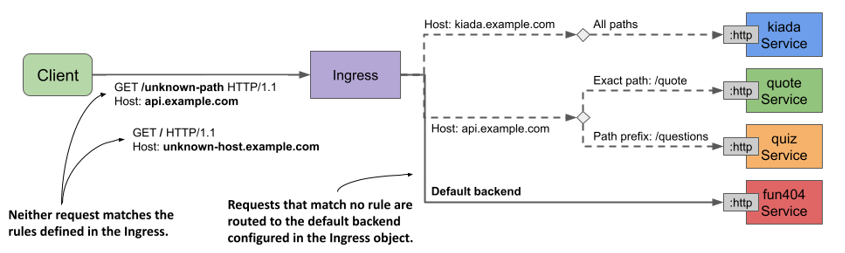
Kubernetes Ingress는 클러스터 내부 및 외부로 트래픽을 라우팅하기 위한 API 및 리소스입니다. Ingress 리소스는 클러스터 내부 및 외부에서 애플리케이션에 대한 HTTP 및 HTTPS 라우팅 규칙을 정의합니다.
역할
호스트 기반 라우팅: Ingress 리소스는 호스트 이름을 기반으로 트래픽을 서로 다른 서비스로 라우팅할 수 있습니다. 예를 들어, www.example.com과 api.example.com을 서로 다른 서비스로 라우팅할 수 있습니다.
경로 기반 라우팅: Ingress 리소스는 URL 경로를 기반으로 트래픽을 서로 다른 서비스로 라우팅할 수 있습니다. 예를 들어, /app1 경로를 가진 요청을 서비스 A로 라우팅하고, /app2 경로를 가진 요청을 서비스 B로 라우팅할 수 있습니다.
백엔드 서비스 연결: Ingress 리소스는 백엔드 서비스와 연결되어 트래픽을 전달합니다. 각 경로별로 다른 백엔드 서비스를 지정할 수 있습니다.
TLS 암호화: Ingress 리소스는 HTTPS 트래픽을 지원하여 SSL/TLS 암호화를 제공할 수 있습니다. 이를 통해 보안된 통신이 가능합니다.
인그레스 컨트롤러: 인그레스 리소스를 관리하고 실제 트래픽 라우팅을 수행하는 컨트롤러입니다. 인그레스 컨트롤러는 클러스터에 설치되어야 하며, 예를 들어 Nginx Ingress Controller, Traefik, or HAProxy와 같은 컨트롤러를 사용할 수 있습니다.
apiVersion: networking.k8s.io/v1
kind: Ingress
metadata:
  name: example-ingress
spec:
  rules:
  - host: app1.example.com
    http:
      paths:
      - path: /
        pathType: Prefix
        backend:
          service:
            name: app1-service
            port:
              number: 80
  - host: app2.example.com
    http:
      paths:
      - path: /
        pathType: Prefix
        backend:
          service:
            name: app2-service
            port:
              number: 80
Ingress에 tls 인증서 적용 예제
인증서 파일은 secret 형태로 저장되어 있어야한다.
apiVersion: networking.k8s.io/v1
kind: Ingress
metadata:
  name: tls-example-ingress
spec:
  tls:
  - hosts:
      - https-example.foo.com
    secretName: testsecret-tls
  rules:
  - host: https-example.foo.com
    http:
      paths:
      - path: /
        pathType: Prefix
        backend:
          service:
            name: service1
            port:
              number: 80
Ingress Annotation
Ingress Controller에 대한 자세한 설정을 할 있는 방법입니다.
nginx.ingress.kubernetes.io/proxy-body-size: 50m
nginx.ingress.kubernetes.io/ssl-redirect: "true"
nginx.ingress.kubernetes.io/rewrite-target: /$1
nginx.ingress.kubernetes.io/ssl-redirect: "true"Storage
Kubernetes에서 Volume은 컨테이너 내부 및 컨테이너 간에 데이터를 공유하거나 데이터를 저장하기 위한 디스크 공간을 제공하는 추상적인 개념입니다.
apiVersion: v1
kind: Pod
metadata:
  name: mypod
spec:
  containers:
  - name: mycontainer
    image: nginx
    volumeMounts:          # Volume Mounts 정의
    - name: myvolume       # 사용할 볼륨의 이름
      mountPath: /data     # 볼륨을 마운트할 경로
  volumes:                 # Volumes 정의
  - name: myvolume         # 볼륨의 이름
    emptyDir: {}           # 빈 디렉터리를 사용한 예시
Storage 종류
emptyDir
hostPath
nfs
rbd
configmap
secret
PVC
etc..
Ephemeral Storage
컨테이너 내부 filesystem에 저장
Pod내 여러 컨테이너가 공유해서 쓸 수 있는 EmptyDir 볼륨
Pod가 종료 시 삭제됨
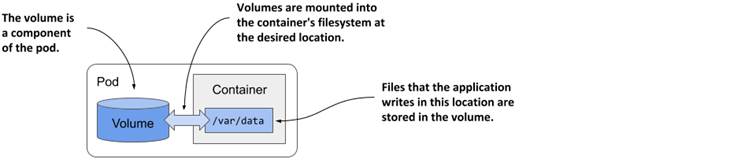
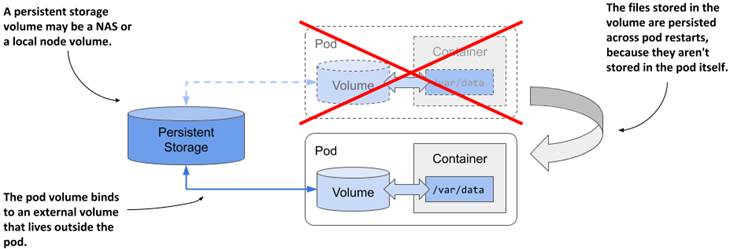
Persistent Storage
Pod의 LifeCycle과 무관하게 별도로 관리되는 볼륨 형태
여러 Pod에서 읽기/쓰기 가능
이전 Pod가 종료되어도 다음 Pod에서 이어사 사용 가능
Persistent Volume (PV)
Persistent Volume (PV)는 Kubernetes에서 영구적인 데이터를 저장하기 위한 추상적인 개념입니다. PV는 클러스터 내의 스토리지를 나타내며, 파드가 요청할 때 동적으로 할당되거나 사전에 정의된 PV를 사용할 수 있습니다.

apiVersion: v1
kind: PersistentVolume
metadata:
  name: nfs-pv
spec:
  capacity:
    storage: 5Gi
  volumeMode: Filesystem
  accessModes:
    - ReadWriteMany
  persistentVolumeReclaimPolicy: Retain
  storageClassName: nfs-storage
  nfs:
    server: <NFS_Server_IP>
    path: /path/to/nfs/share
Persistent Volume Claim (PVC)
쿠버네티스에서 Persistent Volume Claim (PVC)은 애플리케이션이나 사용자가 클러스터 내의 Persistent Volume (PV)을 요청하고 사용하는 방법을 정의합니다. PVC는 스토리지 요청에 대한 추상화를 제공하며, 클러스터 관리자는 PVC를 사용하여 사용자에게 적절한 스토리지를 제공할 수 있습니다.
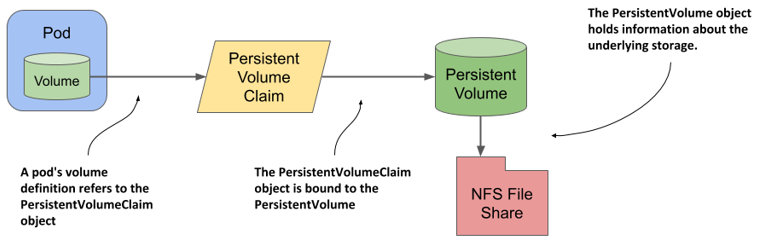
스토리지 클래스(Storage Class): PVC는 요청하는 스토리지 클래스를 지정할 수 있습니다. Storage Class는 클러스터 관리자가 프로비저닝 된 PV를 관리하는 데 사용하는 정책과 프로비저닝 파라미터를 정의합니다.
용량(Capacity): PVC는 요청하는 스토리지의 용량을 지정할 수 있습니다. 이는 PVC가 사용할 수 있는 스토리지의 크기를 나타냅니다.
액세스 모드(Access Mode): PVC는 요청하는 스토리지의 액세스 모드를 지정할 수 있습니다. 이는 해당 스토리지에 대한 액세스 권한을 결정합니다. 일반적으로 ReadWriteOnce(RWO), ReadOnlyMany(ROX), ReadWriteMany(RWX) 세 가지 모드가 있습니다.
볼륨 속성 설정: PVC는 요청하는 스토리지의 속성을 설정할 수 있습니다. 이는 스토리지 클래스의 설정에 따라 다를 수 있으며, 예를 들어 볼륨의 복제 정책이나 스토리지 유형을 지정할 수 있습니다.
요청 상태 및 확인: PVC는 스토리지 클래스에 대한 요청 상태를 추적하고, 해당 클래스에 사용 가능한 PV를 확인합니다. 이를 통해 PVC는 요청하는 스토리지의 프로비저닝 및 할당 상태를 파악할 수 있습니다.
apiVersion: v1
kind: PersistentVolumeClaim
metadata:
  name: nfs-pvc
spec:
  accessModes:
    - ReadWriteMany
  volumeName: example-pv   # Specify the name of the PV here
  resources:
    requests:
      storage: 5Gi
Storage Class
쿠버네티스에서 StorageClass는 PVC에 의해 Persistent Volume (PV)를 동적으로 프로비저닝하고, 스토리지 클래스에 대한 프로비저닝 파라미터 및 정책을 정의하는 리소스입니다.

Provisioning: StorageClass는 사용자가 PVC를 생성할 때 동적으로 PV를 프로비저닝하는 데 사용됩니다. 이를 통해 사용자는 스토리지에 대한 요구 사항을 정의하고 PVC를 생성할 때 스토리지가 자동으로 프로비저닝됩니다.
Provisioning 파라미터: StorageClass는 프로비저닝할 PV에 대한 파라미터를 정의할 수 있습니다. 예를 들어, 스토리지 유형, 스토리지 용량, 복제 정책 등을 지정할 수 있습니다.
Volume 속성 설정: StorageClass는 프로비저닝된 PV의 속성을 설정합니다. 이는 사용자가 PVC를 요청할 때 지정한 속성에 따라 결정됩니다.
재사용 정책: StorageClass는 PV를 다시 사용할 때 어떻게 처리할지를 결정하는 정책을 정의합니다. 이는 PV가 더 이상 사용되지 않을 때 삭제할지 여부를 결정하거나 재활용할지 여부를 결정하는 데 사용됩니다.
RBAC
기본 개념
ServiceAccount
Role
RoleBinding
ClusterRole
ClusterRoleBinding
serviceaccount.yaml
apiVersion: v1
kind: ServiceAccount
metadata:
  annotations:
    kubernetes.io/enforce-mountable-secrets: "true"
  name: my-serviceaccount
  namespace: my-namespace
Pod
spec.serviceAccountName 지정 -> /var/run/secrets/kubernetes.io/serviceaccount
role.yaml
apiVersion: rbac.authorization.k8s.io/v1
kind: Role
metadata:
  namespace: default
  name: pod-reader
rules:
- apiGroups: [""] # "" indicates the core API group
  resources: ["pods"]
  verbs: ["get", "watch", "list"]
rolebinding.yaml
apiVersion: rbac.authorization.k8s.io/v1
kind: RoleBinding
metadata:
  name: read-pods
  namespace: default
subjects:
# You can specify more than one "subject"
- kind: User
  name: jane # "name" is case sensitive
  apiGroup: rbac.authorization.k8s.io
roleRef:
  # "roleRef" specifies the binding to a Role / ClusterRole
  kind: Role #this must be Role or ClusterRole
  name: pod-reader # this must match the name of the Role or ClusterRole you wish to bind to
  apiGroup: rbac.authorization.k8s.io
사용자에게 권한 부여
PEM 생성
openssl genrsa -out myuser.key 2048
CSR 생성
CN is the name of the user
O is the group that this user will belong to
openssl req -new -key myuser.key -out myuser.csr -subj "/CN=myuser"CSR을 base64로 encode
cat myuser.csr | base64 | tr -d "\n"
csr.yaml 작성
usages has to be ‘client auth’
expirationSeconds could be made longer ``` apiVersion: certificates.k8s.io/v1 kind: CertificateSigningRequest metadata: name: myuser spec: request: LS0tLS1CRUdJTiBDRVJUSUZJQ0FURSBSRVFVRVNULS0tLS0KTUlJQ1ZqQ0NBVDRDQVFBd0VURVBNQTBHQTFVRUF3d0dZVzVuWld4aE1JSUJJakFOQmdrcWhraUc5dzBCQVFFRgpBQU9DQVE4QU1JSUJDZ0tDQVFFQTByczhJTHRHdTYxakx2dHhWTTJSVlRWMDNHWlJTWWw0dWluVWo4RElaWjBOCnR2MUZtRVFSd3VoaUZsOFEzcWl0Qm0wMUFSMkNJVXBGd2ZzSjZ4MXF3ckJzVkhZbGlBNVhwRVpZM3ExcGswSDQKM3Z3aGJlK1o2MVNrVHF5SVBYUUwrTWM5T1Nsbm0xb0R2N0NtSkZNMUlMRVI3QTVGZnZKOEdFRjJ6dHBoaUlFMwpub1dtdHNZb3JuT2wzc2lHQ2ZGZzR4Zmd4eW8ybmlneFNVekl1bXNnVm9PM2ttT0x1RVF6cXpkakJ3TFJXbWlECklmMXBMWnoyalVnald4UkhCM1gyWnVVV1d1T09PZnpXM01LaE8ybHEvZi9DdS8wYk83c0x0MCt3U2ZMSU91TFcKcW90blZtRmxMMytqTy82WDNDKzBERHk5aUtwbXJjVDBnWGZLemE1dHJRSURBUUFCb0FBd0RRWUpLb1pJaHZjTgpBUUVMQlFBRGdnRUJBR05WdmVIOGR4ZzNvK21VeVRkbmFjVmQ1N24zSkExdnZEU1JWREkyQTZ1eXN3ZFp1L1BVCkkwZXpZWFV0RVNnSk1IRmQycVVNMjNuNVJsSXJ3R0xuUXFISUh5VStWWHhsdnZsRnpNOVpEWllSTmU3QlJvYXgKQVlEdUI5STZXT3FYbkFvczFqRmxNUG5NbFpqdU5kSGxpT1BjTU1oNndLaTZzZFhpVStHYTJ2RUVLY01jSVUyRgpvU2djUWdMYTk0aEpacGk3ZnNMdm1OQUxoT045UHdNMGM1dVJVejV4T0dGMUtCbWRSeEgvbUNOS2JKYjFRQm1HCkkwYitEUEdaTktXTU0xMzhIQXdoV0tkNjVoVHdYOWl4V3ZHMkh4TG1WQzg0L1BHT0tWQW9FNkpsYWFHdTlQVmkKdjlOSjVaZlZrcXdCd0hKbzZXdk9xVlA3SVFjZmg3d0drWm89Ci0tLS0tRU5EIENFUlRJRklDQVRFIFJFUVVFU1QtLS0tLQo= signerName: kubernetes.io/kube-apiserver-client expirationSeconds: 86400 # one day usages:
client auth ```
kubectl apply -f csr.yaml
kubectl get csr
kubectl certificate approve myuser
kubectl get csr/myuser -o yaml
kubectl get csr myuser -o jsonpath='{.status.certificate}'| base64 -d > myuser.crt
kubeconfig에 추가
kubectl config set-credentials myuser --client-key=myuser.key --client-certificate=myuser.crt --embed-certs=true
개발자가 알아야할 쿠버네티스 지식
Readiness Probe
컨테이너가 사용 가능한 상태로 되었는지 여부를 확인하는 것아며 특하 시작이 오래걸리는 앱이 준비되기 전에 사용자 요청받는 것을 대비하는데 유용하다.
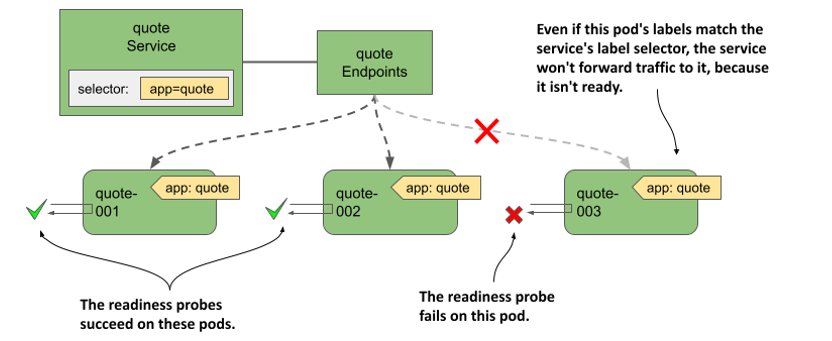
타입:
HTTP: 컨테이너가 특정 엔드포인트에 HTTP 요청에 응답하는지 여부를 확인합니다. 응답 코드에 따라 성공 또는 실패로 판단할 수 있습니다.
TCP: 컨테이너가 특정 포트에서 TCP 소켓 연결을 수락하는지 여부를 확인합니다.
Command: 컨테이너 내부에서 사용자 지정 명령을 실행하여 성공 또는 실패를 확인합니다.
workload.yaml
spec:
  containers:
  - name: mycontainer
    image: nginx
    ports:
    - containerPort: 80
    readinessProbe:                   # 레디니스 프로브 정의
      httpGet:
        path: /                      # 체크할 경로
        port: 80                     # 포트
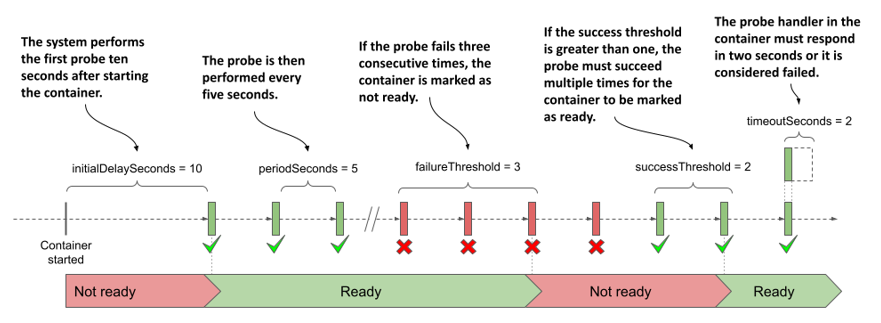
      initialDelaySeconds: 5         # 시작 후 최초 체크 딜레이 (초)
      periodSeconds: 10              # 주기적으로 체크할 간격 (초)
      timeoutSeconds: 5              # 타임아웃 (초)
      successThreshold: 1            # 성공을 인정하는 임계값
      failureThreshold: 3            # 실패를 인정하는 임계값
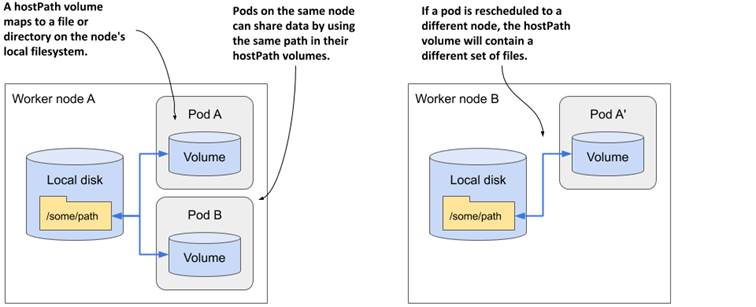
HostPath
쿠버네티스에서 HostPath 볼륨은 호스트 머신의 파일 시스템 경로를 Pod에 마운트하는 데 사용됩니다.
팁:
Host OS에 있는 Trusted CA 인증서 파일을 파드내에 마운트해서 사용할 때 용이하다.
SubPath
Pod and Service DNS
Cluster내 모든 파드와 서비스가 dns 주소를 가지게 되며 규칙은 다음 그림과 같습니다.

Scheduling
nodeName
nodeSelector
nodeAffinity
nodeName
``` apiVersion: v1 kind: Pod metadata: name: nginx spec: containers:
name: nginx image: nginx nodeName: kube-01
#### nodeSelectorapiVersion: v1 kind: Pod metadata: name: nginx labels: env: test spec: containers:
name: nginx image: nginx imagePullPolicy: IfNotPresent nodeSelector: disktype: ssd ```
nodeAffinity
쿠버네티스에서 NodeAffinity는 Pod이 특정 노드에 스케줄링되도록 하는 데 사용되는 기능입니다. NodeAffinity는 Pod 스케줄링에 영향을 주는 조건을 정의하는 데 사용됩니다. 주요 개념은 다음과 같습니다:
requiredDuringSchedulingIgnoredDuringExecution: 이는 Pod이 특정 노드에 반드시 스케줄링되어야 함을 나타냅니다. 만약 해당 조건을 만족하는 노드가 없으면 Pod은 스케줄링되지 않습니다. 그러나 이미 해당 노드에 스케줄링된 Pod은 이러한 조건이 변경되더라도 영향을 받지 않습니다.
preferredDuringSchedulingIgnoredDuringExecution: 이는 Pod이 특정 노드에 스케줄링되길 원하지만, 필수는 아님을 나타냅니다. 이러한 조건을 만족하는 노드가 없는 경우 다른 노드에도 Pod이 스케줄링될 수 있습니다.
apiVersion: v1
kind: Pod
metadata:
  name: with-node-affinity
spec:
  affinity:
    nodeAffinity:
      requiredDuringSchedulingIgnoredDuringExecution:
        nodeSelectorTerms:
        - matchExpressions:
          - key: topology.kubernetes.io/zone
            operator: In
            values:
            - antarctica-east1
            - antarctica-west1
      preferredDuringSchedulingIgnoredDuringExecution:
      - weight: 1
        preference:
          matchExpressions:
          - key: another-node-label-key
            operator: In
            values:
            - another-node-label-value
  containers:
  - name: with-node-affinity
    image: registry.k8s.io/pause:2.0
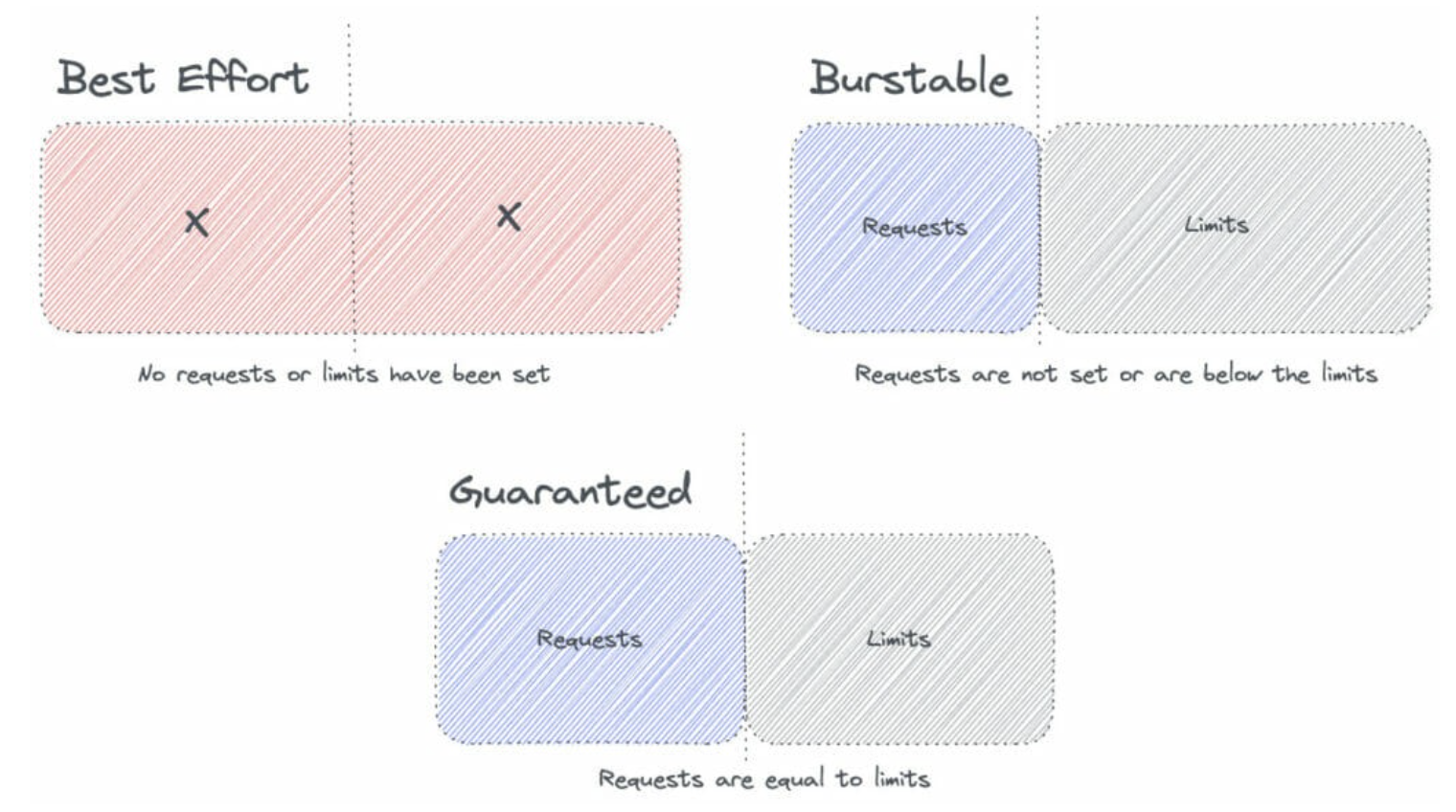
QOS
request
limit
---
apiVersion: v1
kind: Pod
metadata:
  name: frontend
spec:
  containers:
  - name: app
    image: images.my-company.example/app:v4
    resources:
      requests:
        memory: "64Mi"
        cpu: "250m"
      limits:
        memory: "128Mi"
        cpu: "500m"
K8S 환경에서 디버깅
kubectl get pods - pod 상태 확인
kubectl get events
kubectl describe
kubectl get -o yaml
kubectl logs
kubectl logs –previous
kubectl exec
kubectl debug
curl/telnet/wget